
Check web server availability; using Go websocket server
In this tutorial I will explain how to write a simple websocket server with the go gorilla framework and a simple client in JavaScript to interface with it.
Original Article Medium: Check web server availability: using Go websocket server.
These days, there is a very high demand for instant messaging, chat, online gaming and IoT applications which are based on real-time technologies, as we’ll see in the example I try to check if my API servers are down and up ( though we can use observability tools , usually in large distributed system) but in my small world I needed to have a simple tool to do this.
Websocket is a communication protocol, providing full-duplex communication channels over a single TCP connection.Which means a single HTTP connection opened can be used to send messages back and forth between a server. Websocket overcomes limitations with HTTP to allow for low latency communications between a user and a web service.
Golang is known for building highly concurrent and scalable networking applications. Although, most of the web APIs are natively supported in golang, there are web toolkits available like gorilla, on top of which web applications can be built. Golang official doc recommends using gorilla websocket for building websocket based applications.
….
Install both gorilla/mux and gorilla/websocket, and to do that use
$ go get github.com/gorilla/mux
$ go get github.com/gorilla/websocket
See the official documentation for more go gorilla framework
go/mux server
We start by setting up our server and setting a single [Get] route /feedback this is the route we’ll be receiving and sending our messages on.
package main

import (
	"context"
	"github.com/idawud/server-monitor/service"
	"log"
	"net/http"
	"os"
	"os/signal"
	"time"
	"github.com/gorilla/mux"

 )

var (
	l = log.New(os.Stdout, "medium-monitor ", log.LstdFlags)
)

func main() {

	// Setting up our only route
	sm := mux.NewRouter()
	sm.HandleFunc("/feedback", WebsocketEndpoint)


	// server connection tuning
	server := &http.Server{
		Addr: ":8080",
		Handler: sm,
		IdleTimeout:120*time.Second,
		ReadTimeout: 1*time.Second,
		WriteTimeout:1*time.Second,
	}

	log.Println("Server running on http://localhost:8080/")
	// Run server on port :8080
	go func() {
		err := server.ListenAndServe()
		if err != nil {
			l.Fatal(err)
		}
	}()

	// Graceful shutdown with Ctrl+C
	sigChan := make(chan os.Signal)
	signal.Notify(sigChan, os.Interrupt)
	signal.Notify(sigChan, os.Kill)

	sig := <-sigChan
	l.Println("Graceful shutdown", sig)

	ctx, _ := context.WithTimeout(context.Background(), 30*time.Second)
	_ = server.Shutdown(ctx)
}
main.go : gorilla/mux route and server listening
We now implement our WebsocketEndpoint (the function handler for our route) which takes http.ResponseWriter, *http.Request params as any usual mux route. With this we get a websocket connection which we’ll use to receive and write back messages to the client.
// import gorilla/websocket
import (
    ...
    "github.com/gorilla/websocket"
)

// Setup the socket connection buffer size for read & write
// & allowing CORS on all origins so that we'll test it with our client
var upgrader = websocket.Upgrader{
	ReadBufferSize: 1024,
	WriteBufferSize: 1024,
	CheckOrigin: func(r *http.Request) bool {return true },
}

// the /feedback route implementation
func WebsocketEndpoint(writer http.ResponseWriter, request *http.Request) {
	l.Println("Main WebSocket (Start)")
	ws, err := upgrader.Upgrade(writer, request, nil)
	if err != nil {
		l.Println("Error: ", err)
	}
	l.Println("Client successfully connected")

	// read message from client and write back
	readerAndWriter(ws)
}
websocket-connection.go connection: set the params for buffer size on onConnect
We have a connection now and a method to read and write messages from the client, but we are yet to implement what and how it is received and published. In this example, our clients writes a message on-connect and the server sends back messages every 15 sec while the connection lasts.
// Listens for message on socket connection and also sens back messages to the client
func readerAndWriter(ws *websocket.Conn) {
	// run infinitely
	for  {
		messageType, p, err := ws.ReadMessage()
		if err != nil {
			l.Println(err)
			return
		}
		// read message on received
		l.Println("Client Message: ", string(p))

		// write message to client every 15secs
		for  {
			// get the server status
			availability, err := service.GetAllAvailability()
			if err != nil {
				l.Println("Error: ", err)
			} else {
				// write the message to the client which connected to it
				if err := ws.WriteMessage(messageType, availability); err != nil {
					l.Println("Error: ", err)
					_ = ws.Close()
				} else {
					l.Println("New Data Published")
				}
			}

			time.Sleep(time.Second * 15)
		}

	}
}
read-write.go read client message and write message to the client
Our last bit on the server is the actual code which checks if our APIs are working as expected.
package service

import (
"encoding/json"
"net/http"
"time"
)

// endpoint on the server to test against
var ENDPOINTS = []string{
	"https://idawud.tech/myserice/api/v1/todos",
	"http://localhost:8080/api/v2/todos",
}

// Make a [HEAD] request on any point on the service server
// if the status code isn't between 200 & 299 then something
// went wrong on the server
// Else everything is ok
func CheckEndpointAvailable(url string) bool {
	res, err := http.Head(url)
	if err != nil {
		return false
	}
	if res.StatusCode >= 200 && res.StatusCode <= 299 {
		return true
	}
	return false
}

// check the availability of all the endpoints and return the them as
// map of the key=url,value=availability true/false & addition
// for the timestamp of reading
func GetAllAvailability() ([]byte, error) {
	var result =  make(map[string]interface{})
	for _, ep := range ENDPOINTS{
		result[ep] = CheckEndpointAvailable(ep)
	}
	result["timestamp"] = time.Now().String()
	return json.Marshal(result)
}
service.go check endpoint status on server
….
Websocket Client
Lots of browser vendors ship js library for working with websocket . To run the .html client on its own server we use a tool called live-server . Run
$ live-server .
This will redirect to the web browser. Inspecting the console we see the message has been sent and see all subsequent messages received from the server.
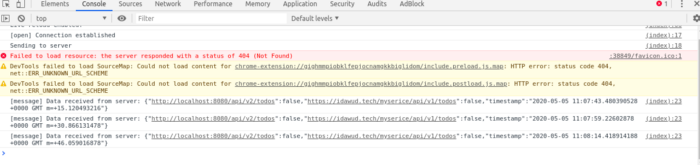 clients console: viewing real-time server status
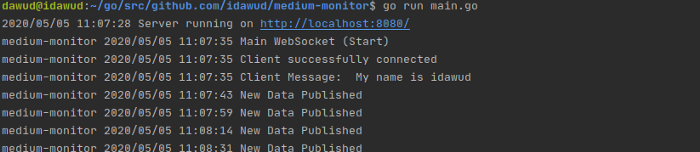
Checking the main Go server, we see the log of the interaction activity from the clients and server.
The full code is available at https://github.com/idawud/medium-monitor .
I hope this was helpful. Please contact me if you find any error in the writing, have any suggestion for improvement or any opportunity.