Apollo Graphql Express Server
GraphQL is a syntax that describes how to ask for data, and is generally used to load data from a server to a client. GraphQL has three main characteristics:
- It lets the client specify exactly what data it needs.
- It makes it easier to aggregate data from multiple sources.
- It uses a type system to describe data.
For example, imagine you need to display a list of posts, and under each post a list of likes, including user names and avatars. This will typically be a call to the posts, likes and users endpoints or APIs but with graphql all this can be merge as a simple query easily.
In this post we’ll look at a simple movie store graphql API server;
Setup
I generated a simple graphql project with create-graphql-api by running npx create-graphql-api <project-name>. This will generate a project with sqlite, orm, pre-configured for us on a apollo express server.
Delete the User.ts and HelloWorldResolver.ts files as we will not be using it. Under entity create an empty Movie.ts file and under resolvers create another empty MovieResolver.ts and in the index.ts file update the resolvers resolvers: [ MovieResolver],.
Entity
In the Movie.ts we created, we declared the Movie model here and use the orm to map it into a Database table.
import { PrimaryGeneratedColumn, Column, Entity, BaseEntity } from "typeorm";
import { Field, Int, Float, ObjectType } from "type-graphql";

@ObjectType()
@Entity()
export class Movie extends BaseEntity {
    @Field(() => Int)
    @PrimaryGeneratedColumn()
    id: number;

    @Field()
    @Column()
    title: string;

    @Field(() => Float)
    @Column('double', {default: 60})
    minutes: number;
}
The Movie model has three fields id, title, and minutes. The ObjectType annotation means this is an object graphql can return and the Fields annotations declared them as fields for graphql with an optional type callback for types which can’t be automatically inferred such as Float and Int from number unlike string which can be auto inferred.
The Movie class extends the orm’s BaseEntity which allows to access a bunch of useful static methods on the Movie class. The Entity annotation means orm should create a table which the fields on the database if it does not exist. Column declares a field as a field on the table to create on the database which can take many optional parameters such as the type, default value, nullable etc. The last annotation is the PrimaryGeneratedColumn which declares id as a primary key when the table is created.
Resolver
In the MovieResolver.ts let create our resolver, by adding the @Resolver annotation. The resolver specifies the mutations and queries that can be executed.
@Resolver()
export class MovieResolver {}
Since we are building a simple crud app our mutations will be createMovie, updateMovie and deleteMovie while our queries will be movies to get all movies and movie to get movie by an ID.
Let’s jump right in; To create and update Movies we must take in an movie object to do it,, so we create an InputType for it with two optional parameters title and minutes, ignoring the id since it will be auto generated for us from our Movie Model.
@InputType()
class MovieInput{
    @Field()
    title?: string;

    @Field(() => Float)
    minutes?: number;
}
run npm start access graphql playground at http://localhost:4000/graphql
Create Movie (Mutation)
We create a function in the MovieResolver class and annotate it with Mutation since it changes or updates our database. This method is make async since we want to wait on the insertion first before returning the movie created.
The Arg annotation specifies the input parameter for the mutation function, since we want to use our own MovieInput we specify the type as options and a callback to the MovieInput which will be our returns.
Because we extended the BaseEntity on the Movie Model, we can create an Movie type from the input and then save it into the database.
 @Mutation(() => Movie)
    async createMovie(
		@Arg('options', () => MovieInput) options: MovieInput
	) {
        const movie: Movie = await Movie.create(options).save();
        return movie;
    }
In the playground run a mutation to create a new Movie, by providing a options object with title and minutes to the createMovie function and we specify the fields we want to select on the movie just created in this case all the 3 fields.
mutation {
  createMovie(
    options: {
      title: "New Movie",
      minutes: 75
    }
  ){
    id
    title
    minutes
  }
}
response will be in the format
{
  "data": {
    "createMovie": {
      "id": 6,
      "title": "New Movie",
      "minutes": 75
    }
  }
}

Get Movies (Query)
Add another function to the MovieResolver class, this time the annotation is a Query and the functions takes no parameters. The find on the BaseEntity class the function extends returns all the movies in the database.
@Query(() => [Movie])
    movies(){
        return Movie.find();
    }
To run this query in the playground run;
query{
  movies{
    id
    title
    minutes
  }
}
response will be in the format
{
  "data": {
    "movies": [
      {
        "id": 1,
        "title": "Identity Theft",
        "minutes": 93.5
      },
      {
        "id": 2,
        "title": "the new movie",
        "minutes": 65
      }
    ]
  }
}
Get Movies by Id (Query)
To get a movie by an Id looks almost the same as what we’ve seen above but this Query takes in an ID as a argument. This also returns a single movie instead of an array of Movies we’ve seen above.
 @Query(() => Movie)
    movie(
		@Arg('id', () => Int) id: number
	){
        return Movie.findOne({id});
    }
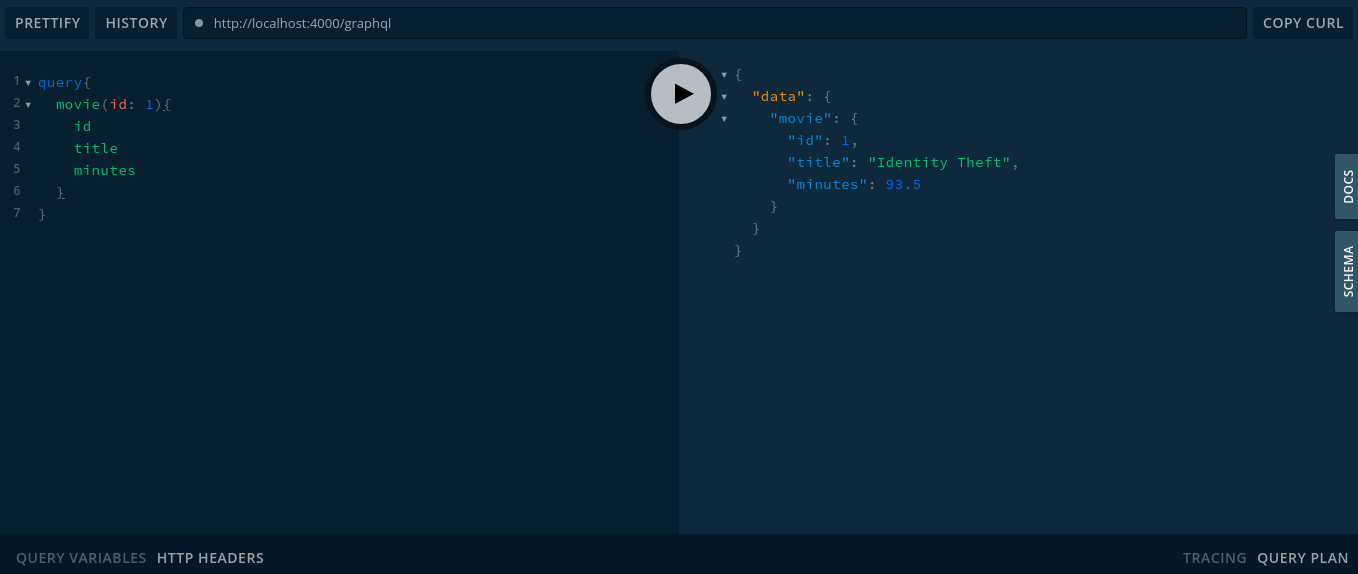
To run this query in the playground run;
query{
  movie(id: 1){
    id
    title
    minutes
  }
}
response will be in the format
{
  "data": {
    "movie": {
      "id": 1,
      "title": "Identity Theft",
      "minutes": 93.5
    }
  }
}
Update Movie (Mutation)
The updateMovie takes in the id of the movie to update and the new MovieInput options and returns True if the update is successful.
@Mutation(() => Boolean)
    async updateMovie(
        @Arg('id', () => Int) id: number,
        @Arg('options', () => MovieInput) movieUpdate: MovieInput
    ) {
        await Movie.update({id}, movieUpdate);
        return true;
    }
To run this query in the playground run;
mutation {
  updateMovie(id: 2, options: {
    title: "the new movie",
    minutes: 65
  })
}
response will be in the format
{
  "data": {
    "updateMovie": true
  }
}
Delete Movie (Mutation)
This also takes in the id of the movie to delete and returns true if delete is successful.
@Mutation(() => Boolean)
	async deleteMovie(@
		Arg('id', () => Int) id: number
	) {
        await Movie.delete({id});
        return true;
    }
To run this query in the playground run;
mutation {
  deleteMovie(id: 2)
}
response will be in the format
{
  "data": {
    "deleteMovie": true
  }
}
The full code is available on GitHub https://github.com/idawud/ts-graphql-crud